

Table of Contents
I used to think I needed the perfect note-taking app to organise notes.
- Something clean.
- Something searchable.
- Something beautifully organised.
- Something that would finally hold all my random thoughts, tasks, ideas, reminders, and life admin details that keep floating around my head.
Over the years, I have tried different ways of keeping notes.
- Phone notes
- Notebooks
- Apps
- Screenshots
- Saved messages
- Random lists
The problem was not that these tools were bad.
The problem was that I had no real note organisation system.
Everything existed somewhere.
Which basically meant nothing felt fully captured.
When notes are scattered everywhere, your brain feels that it responsible for remembering them.
and that is exactly what I intended to stop.
Why I Stopped Chasing the Perfect Notes App
Fancy apps are not the problem.
But if your system is unclear, a fancy app just becomes a prettier mess.
I was doing exactly that when I realised I was using fancy tools to avoid making decisions about my notes.
Where should this go?
When will I check it?
Is this a task, an idea, or reference information?
Do I need this today, later, or never?
Without those decisions, every tool eventually became another storage drawer.
That is why I now keep my note system simple.
Not because simple looks better.
Because simple gets remembered and used.
My Notes System Has Only Three Buckets
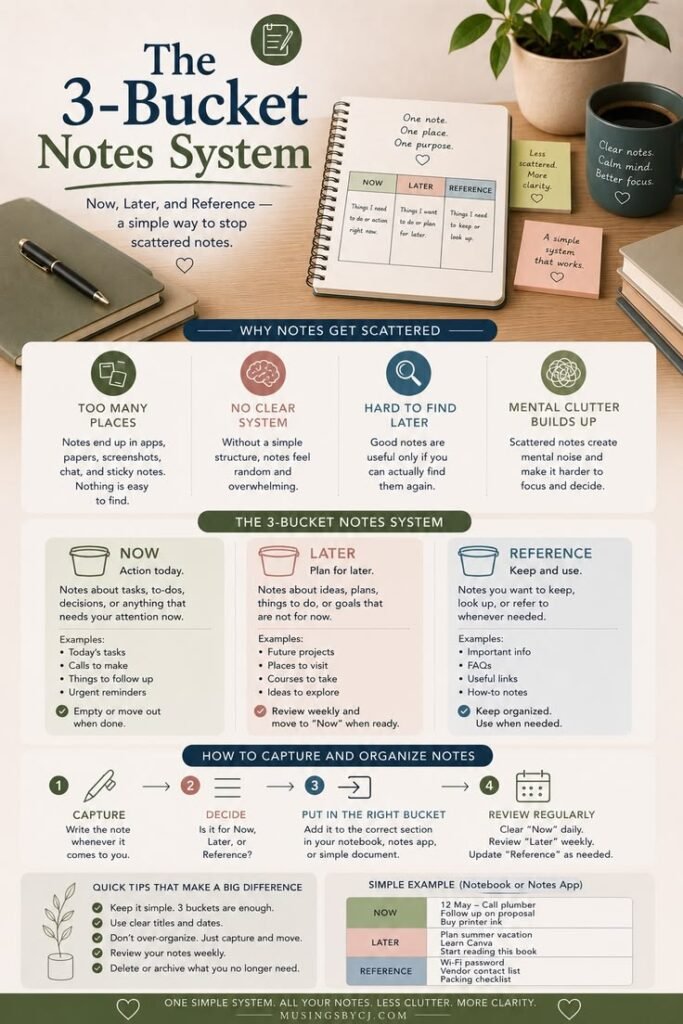
I organise notes into three categories and this is the entire system.
- Now
- Later
- Reference
That is it.
No complicated tags.
No twenty folders.
No dramatic digital filing system.
Just enough structure to stop everything from floating around.
If you use one notebook for this, simple sticky tabs can help separate Now, Later, and Reference without turning the system into a full project. You can see the kind of sticky tabs I mean here: Sticky Notes
1. Now Notes
These are notes that need action to be taken on them soon.
Examples:
- reply to someone
- pay a bill
- book an appointment
- finish a small task
- check something for work
- follow up on something
These notes should not disappear into a general notebook or app.
They need visibility.
So I keep them in one clear place and review them regularly.
For me, this usually connects with my simple to-do list system.
Because a note that needs action should eventually become a task.
Otherwise, it just sits there making your brain nervous.
2. Later Notes
These are useful, but not urgent.
Examples:
- ideas
- things to research
- products to compare
- recipes to try
- topics to write about
- things I want to revisit
This is the category that used to create the most mess for me.
Because “later” notes feel important enough to keep, but not urgent enough to act on.
So they keep piling up quietly.
But now I have given them a proper holding place.
Not a perfect one.
Just a place where they can wait without interrupting ‘my today’.
That distinction matters a lot.
3. Reference Notes
These are notes I may need again.
Examples:
- instructions
- document details
- recurring information
- useful links
- account-related notes
- measurements
- important numbers
Reference notes should absolutely not be mixed with daily reminders.
That creates unnecessary noise and digital clutter.
If I only need something later, I don’t want to see it every time I check today’s tasks; right?
This one separation alone made my notes feel much cleaner and calmer.
One thing I try not to do now is let task reminders stay buried inside notes.
Notes are useful for ideas and reference, but tasks need a place where they can be scheduled and followed up. For that, I tested Todoist separately as a simple task and life-admin tool.
The Rule That Made Everything Easier
My rule is simple:
Every note needs a next home.
Not a perfect home.
Just a next home.
If something comes into my head, I capture it first.
Then later, I decide:
- is this for now?
- is this for later?
- is this reference?
- or can I delete it?
That tiny decision keeps notes from becoming another mental junk drawer.
Why I Still Like Simple Tools
I am not against apps.
I just don’t want the app to become the system.
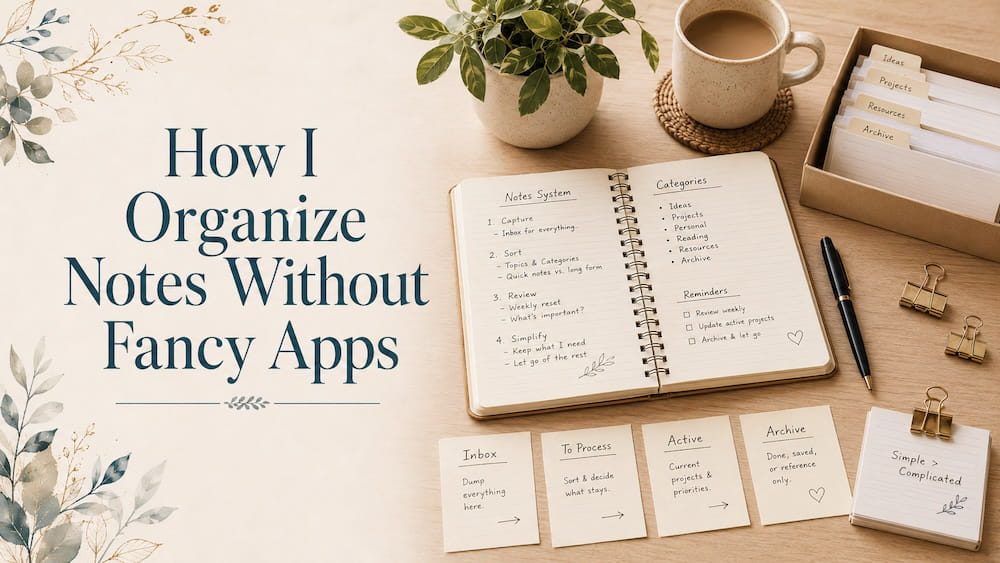
For daily notes, I still like simple tools:
- a notebook
- one notes app
- sticky notes for temporary reminders
- a weekly page for active tasks
If you prefer keeping notes digitally, I have also compared Notability vs Noteshelf for simple note organisation.
The tool should support the system.
It should not create more work.
If you want to see the simple tools I use for planning, notes, and everyday systems, you can find them here: Tools Page
Don’t Organise Every Old Note First
This is important.
If you already have years of messy notes, don’t start by cleaning all of them.
That is a trap.
Start with new notes.
From today onward, use the three buckets:
- Now
- Later
- Reference
Once you get comfortable with this new flow, you can slowly clean the old notes, if needed.
But don’t make cleanup the entry fee. It will only frustrate you and give a reason to give it all up, even before you have started.
I have seem many people abandon systems just because of this.
What Changed After I Simplified My Notes
This simple system to organise notes was a life changer for me. I stopped feeling like everything was scattered.
I didn’t become perfectly organised. I would be lying if i said that.
But my brain stopped having to chase reminders across five different places.
That alone made daily life feel lighter.
Because notes are not just information.
They are open loops.
And once those loops have a place to land, your brain gets some breathing room back.
Final Thought
You don’t need the perfect note-taking app to organise notes better.
You need a simple way to decide what each note is for.
Remember to start with just 3-buckets:
Now.
Later.
Reference.
That small system is enough to reduce mental clutter without turning note organisation into another project.
And honestly?
THAT IS the whole point.
Related Posts
- Why Random Notes Make Your Brain Feel Messy
- Mental Clutter: Why Your Brain Feels Overwhelmed All the Time
- Why Your To-Do List Keeps Failing You
- How I Simplified My Daily Routine
* This post may contain affiliate links. If you buy through them, I may earn a small commission at no extra cost to you.
[…] But whichever tool you choose, the system still matters. […]
[…] one quick capture notes list […]
[…] The real goal is to have an equipment that helps you make your life easier and makes sure that important papers are organised do not stay in piles, drawers, bags, or your […]